
What types of personal checking accounts does Citizens Bank offer?
Citizens Bank offers personal checking account options designed for different banking needs and spending habits. Whether you’re looking for a simple checking account for everyday purchases and bill payments, an account with additional benefits, or an account that can help you earn more from your money, we can help you choose the option that fits your needs. All of our accounts come with a level of personal service you expect from a local, community bank. Contact a local banker to compare your options and find the right checking account for you.
What should I look for when choosing a checking account?
When choosing a checking account, look at monthly fees, minimum balance requirements, ATM access, debit card features, online and mobile banking, bill pay, overdraft options, and any benefits such as interest or rewards. It’s also important to consider the level of personal service you’ll receive. A community bank like Citizens Bank can offer modern and convenient digital banking tools along with access to local bankers who are happy to provide personal assistance when you need it.
How do I open a checking account?
Opening a personal checking account is easy. You’ll generally need a valid form of identification, your Social Security number or taxpayer identification number, and money for your initial deposit. Depending on the type of account, and as long as you are at least 18 years old, you may be able to open your personal checking account online. Certain account openings must happen at a local branch. Once your account is open, you can set up direct deposit, order checks, activate your debit card, and enroll in online and mobile banking.
How much money do I need to open a checking account?
The minimum opening deposit for a checking account can vary by bank and account type. Most personal checking accounts at Citizens Bank can be opened with just $50.
How much money do I need to keep in a checking account?
Just as the minimum opening deposit for a personal checking account can vary by bank and account type, so can the balance you must keep in the account. Most personal checking accounts at Citizens Bank do not have a minimum balance requirement.
Are there checking accounts with no monthly fee?
Yes. Some personal checking accounts have no monthly maintenance fee, like Citizens Bank's Advantage Checking or Smart Start Checking, while others may waive the fee when certain requirements are met, such as maintaining a minimum balance or meeting qualifying transaction requirements. When comparing checking accounts, be sure to look at both the monthly fee and the requirements for avoiding it. Citizens Bank can help you find a personal checking account that fits the way you bank.
What are the benefits of having a checking account at a local bank?
A local, community bank can provide the convenience of modern banking technology while delivering a level of personal service and advice you may not be able to find at larger banks. Customers of Citizens Bank can access online and mobile banking (including a highly rated mobile banking app), debit cards, and other digital tools while also having the opportunity to work directly with local bankers who understand what individuals need in our community. At Citizens Bank, we believe banking is about more than transactions—it’s about building relationships and helping customers reach their financial goals.
How do I switch my checking account to a new bank?
Switching your personal checking account to a new bank can be easier than you might think. Start by opening your new checking account, then move your direct deposits and automatic payments to the new account. Transfer any remaining funds, make sure outstanding checks and payments have cleared, then close your old account once everything has been moved. Citizens Bank can help you create a checklist and make the transition as smooth as possible.
How old do you have to be to open a checking account?
At Citizens Bank, to open and have a personal checking account by yourself -- that is, with no one else listed as an owner of the account -- you must be at least 18 years old. Teens age 13-17 may open and have a checking account, including a debit card, with a parent or legal guardian as a joint owner of the account.
Does a checking account come with a debit card?
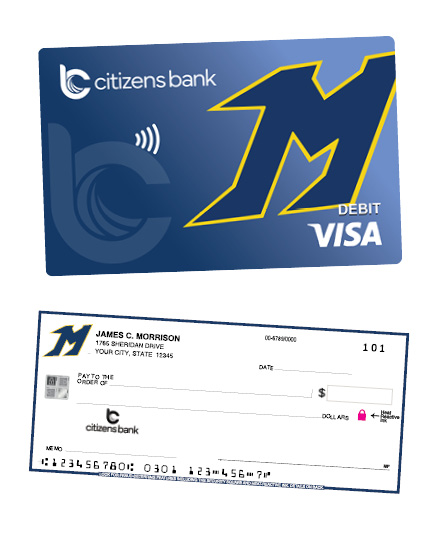
All checking accounts at Citizens Bank include access to a debit card. Debit cards can be used to make everyday purchases, schedule recurring payments, and withdrawal cash from an ATM or ITM. Through our Card Management tool in Digital Banking, you can easily switch your debit card off in the event it is lost or stolen, plus you can set travel notifications or purchase alerts. Citizens Bank also offers an automatic way to save called SaveUp, where you can have your debit card purchases rounded up with the spare change going directly into another account at Citizens Bank. Customers who open a Mukwonago Checking account receive the "M" Debit Card with each debit card purchase going to support student programs at Mukwonago Area School District.
Can I manage my checking account with online banking and mobile banking?
Citizens Bank offers a full Digital Banking suite that can be accessed online through the Citizens Bank website or via the Citizens Bank-WI Mobile App. Either option gives you easy access to view balances and transactions, transfer money between accounts, control your debit card, set up electronic bill payments, send money with Zelle®, view digital account statements and tax documents, and send a secure message to our Customer Support Team. You can also deposit a check via Mobile Deposit in the Mobile App. You can find the highly rated Citizens Bank-WI Mobile App in the App Store® or Google Play™.
What is the best checking account in Mukwonago?
Citizens Bank has partnered with the Mukwonago Area School District to bring you Mukwonago Checking, the best checking account in Mukwonago for anyone wanting to show their local spirit and community pride. Each purchase made with the "M" Debit Card helps support student programs at Mukwonago schools.